

Despite having dozens of other verification methods like Google Authenticator, Passkey, or WhatsApp, Facebook still occasionally asks you to verify via SMS — especially in Business Manager, such as when adding a new colleague or assigning an asset.
I recently ran into this issue myself, as did a few of my clients. After reading just about everything I could find online, I’ve put together a list of tips based on what actually worked for us. These were the issues causing the problem — and fixing them finally made the SMS come through.
1. Switch Facebook to English
This might be the biggest discovery. If your Facebook is set to Czech (or possibly any other non-English language), the verification SMS often won’t arrive. Once I switched my account to English (US), the code started coming through.
2. Check SMS Notifications in the Facebook App
There’s a setting hidden in the Facebook mobile app under Notification Settings that controls whether Facebook is allowed to send you SMS messages. Make sure SMS notifications are enabled there. (This option doesn’t exist in the desktop version, only in the mobile app.)
3. Check Your Spam Folder
It sounds basic, but some phones have a spam or junk folder for SMS messages. In some cases, Facebook’s code lands there quietly — no notification, nothing. Check your messaging app’s spam section just to be sure. I received dozens of verifications from Facebook and they use many phone numbers.
4. Try at Different Times of Day
Even after doing everything above, the SMS still doesn’t come 100% of the time. In my experience, trying at various times of day actually helped. Don’t give up if it doesn’t work right away.
5. Try Switching Back to the Old Business Manager
This one might be a coincidence, but switching from Meta Business Suite back to the classic Business Manager seemed to help. If you’re stuck in Meta Business Suite, try navigating to the older interface.
6. Don’t Bother with Support
Honestly — contacting support was a complete waste of time. I spent two hours on calls with people who seemed to have never seen the Business Manager interface before. Save yourself the headache.
Tips from Others in the Community
I originally shared this post in the PPC Specialist SK/CZ Facebook group and on my LinkedIn profile. I also got some helpful advice from others who’ve dealt with the same issue:
Use the Business Manager mobile app — while it’s far from user-friendly when it comes to sharing assets, it does work and often skips SMS verification altogether.
Try switching browsers — sometimes it works like a charm.
The issue seems to be country-dependent — some people never experience the problem and always receive the code via WhatsApp.
P.S. The cover photo was taken by our co-owner & CTO, Michal Blažek, during his trip to Silicon Valley back in 2018. Little did we know then that we’d one day be troubleshooting issues like this.
Update 09/01/2025: There are two new main reason for SMS problems:
- It is simply overloaded – some days in some countries, your are not gonna receive a SMS. It happened to me that after 48 hours of no-sms in the Czech Republic, text messages started flowing from Germany.
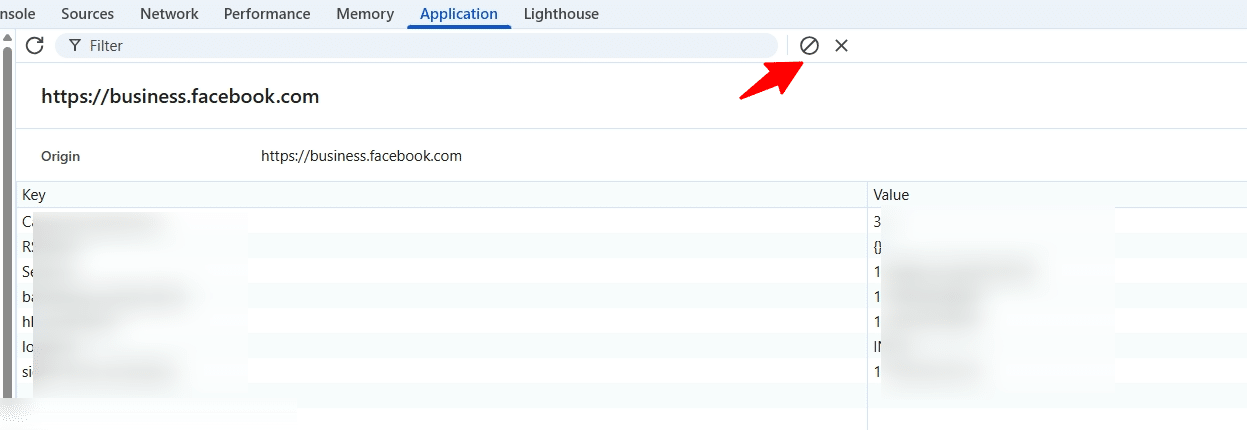
- Problem with local storage – open your local storage on Facebook, click on Application and remove everything:
About Author: Michal Blazek is the senior performance advertising specialist with 15+ years experience. He is responsible for strategy and credential managemet of our key clients.